APAL Forum 2021 App now live!
We look forward to welcoming you to the APAL Forum 2021 – Grow Beyond!
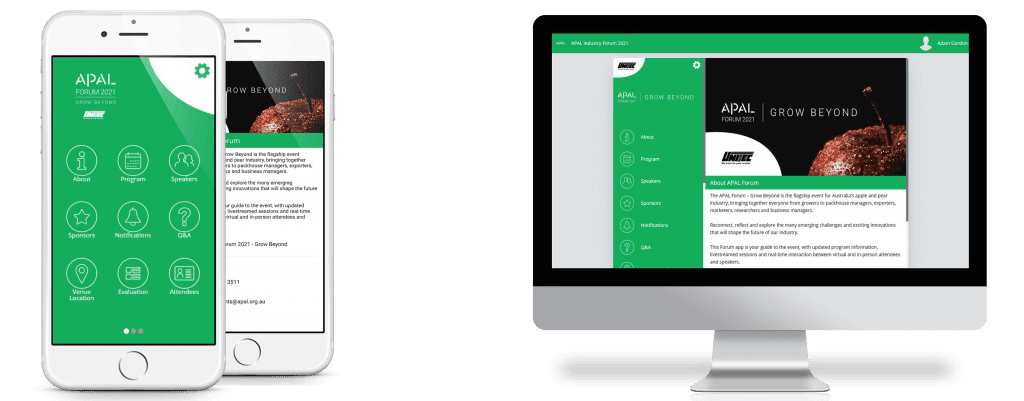
Our Forum app will let all attendees connect and experience the event in real-time, no matter where they are.
Whether you are attending virtually or in-person, you will need to download our APAL Forum App to access key information, network with attendees and take part in interactive sessions.
Follow these simple instructions to download and set up the app, so you can enjoy the best APAL Forum experience.
1. Access the App
Attending in Person
If you are joining us on-site at the MCG in Melbourne, we recommend downloading the Forum App directly onto your smartphone or tablet ahead of time.
To access the Forum App, download the Event Bridge Portal by searching on the App Store or Google Play Store, or going to the link below:
Once you have installed the app, open it and enter the Event Code APALForum21 to access all of the Forum information and program.
Attending virtually
If you are attending remotely, we recommend using the web version of the app. This will allow you to access all the virtual attendance features and livestreamed sessions more easily.
Access the web version via the link below:
2. Enter your login details
Once you have downloaded the app, you can log in with your unique username and password.
These details will have been emailed individually to all attendees.
If you have not received your login details, please get in touch at [email protected]
3. Enjoy the App!
Now that you are logged in, explore the APAL Forum app program and features.
Tips:
- Upload a profile image in My Event –> Account Settings, so you can easily network with other attendees
- Bookmark any sessions you are interested in to create a personalised schedule
- Interested in a certain speaker? Find them in the Speakers section and you can see which sessions they are presenting
- Keep an eye on Notifications for any updates, alerts and changes